

1. Introduction
At the start of 2011, Museum Victoria published a Field Guide to Victorian Animals for iOS devices: iPhone, iPad and iPod Touch. The initial release contains information on over 650 Victorian animals, including birds, mammals, snakes, lizards and frogs, as well as butterflies, snails, spiders and other invertebrates.
Museum Victoria has released the source code for the app under an open source license. In this paper we describe the background to the development of the app and provide a walk-through of the main features of app. We also detail what data an organization needs to gather to create their own field guide using the publicly available source code, and show how presentation within the app can be customised without modification of the source code.
2. Museums and Mobile
Museums around the world are exploring how to engage with mobile technology and the proliferation of new smart devices. Podcasts, mobile websites and native apps all provide new ways for museums to present their content to a section of the public that, when compared to their desktop-bound Internet audience, is currently small but rapidly growing.
The introduction of the iPhone and iPod Touch in 2007 marked the start of a new wave of devices with relatively large screens compared to older Internet-enabled mobile phones. They give the user a more physical connection with the displayed material. Computers in tablet format have been around for many years, but the iPad, released in 2010, is the first device of that form factor which has taken off with the general public. In many ways, development of tools to work on mobile devices is not a new space for museums and art galleries to explore, and mobile phones are not the only type of mobile device that museums need to consider. The major change that has occurred is that, rather than visitors using the museum's devices, they are now bringing their own.
Directed tours, of one form or another and playable on various devices, have been part of the museum experience for a number of years. A number of organizations have now released tours that can be used on mobile phones. And with a number of organisations now experimenting with tours, standards are beginning to emerge. One such standard is TourML, which underpinned the TAP tour from the Indianapolis Museum of Art. Subsequent development of TourML has been "to spur collaboration and contribution from other museums to further develop a tool - owned by the community - that can power and deliver those mobile experiences to the public" (Stein, 2010). By having a standard format for tours, museums will not have to commission bespoke applications for every tour they wish to create.
Tour applications have been particularly successful for art galleries, although a number of museums have also released tours. Such applications are also mainly relevant to visitors who are actually in the physical museum or gallery space. In contrast, natural history museums hold content that can be useful outside the walls of the museum. As well as presenting exhibitions, natural history museums actively engage in research: they are the principal institutions that undertake taxonomic research, building up information about animals or plants, including undertaking traditional morphological taxonomic research, as well as molecular biology, ecological studies and systems analysis.
In undertaking taxonomic research, knowledge is also gained about the biology, reproduction, and distribution of the animals being studied. This more general information is of interest to naturalists, amateur biologists and parataxonomists. It is published as field guides that are useful to these experts, and the general public can use this information to identify plants and animals in, well, the field. In addition to providing written descriptions, field guides are usually visually rich, as images offer the easiest method of rapid identification. Portability is important for use in the field, limiting the size of the printed publication and the number of illustrations. Curatorial staff hold vast amounts of data on the animals they study. Some museums have the resources to publish books, but many do not.
This same data can, and has been, published by museums on the Web. While the initial focus has been on delivering new and existing Web content to mobile devices, 'native' apps are gaining more attention in the sector (Proctor, 2010). In the field, people don't necessarily have access to the Internet. The 3G coverage of national parks and protected areas in the UK is estimated to be only about 18% (Tokumine, 2011). Newer mobile devices may not have a connection to the phone network at all, and are used mainly when they do not have a connection to a network. Publishing this information in a native app, with the data, images and audio stored on the device, overcomes a lack of network connectivity. Unlike developing a mobile version of a website, developing a native app requires a separate development stream, often with a different set of developers.
During 2010, Museum Victoria started development of a field guide app for iOS-based devices. The primary goal of this project was to develop a portable electronic field guide of Victorian fauna for use by the general public. The secondary goal was, as TAP and TourML have done for museum tours, to produce a platform that could be used by other organisations to produce a native iOS app with as few objective-C programming resources as possible.
The field guide utilises the species profiles, images and audio files that were created and gathered for another project, Biodiversity Snapshots, which Museum Victoria launched in 2010.
3. Biodiversity Snapshots
The Biodiversity Snapshots project (http://www.biodiversitysnapshots.net.au/) was developed by Museum Victoria with funding from the Victorian Department of Education and Early Childhood Development - Innovation and Next Practice, and the Atlas of Living Australia. By providing a series of online and offline tools and education resources, the project aims to help school students (target ages 8 - 15) and teachers to undertake field trips and report on their local fauna and flora.
The project encourages users to conduct their field research in a range of environments throughout Victoria, from the cities to the bush and along the coast. To this end, curators and educators at Museum Victoria constructed a list of species that represent a broad cross-section of the animals that students could expect to find, including species that were threatened or endangered.
All of the animals included in the Biodiversity Snapshots field guide were species that have been collected during Museum Victoria's 156 year history. While individual specimens are documented in Museum Victoria's collection management system (KE Software's EMu), species level descriptions had not been entered. During the development of the Biodiversity Snapshots field guide, extensive new information was added to the Taxonomy module in EMu to create the species descriptions. Information was written by curatorial, collection management and project staff with reference to their own or other Museum Victoria publications, such as Melbourne's Wildlife Guide (Museum Victoria, 2006). Distribution maps were created from historic specimen records, with additional manual cartography, as the records in the collection often created an underrepresentation of a known distribution. Images of the animals, alive and in their habitat, were obtained from Museum Victoria's photographic collection or licensed from external sources. For the frog and bird species, audio files were added to the record.
Storing these detailed species records within Emu means the information is easily updated by curators using their existing tools. More important, all the information, images and audio can easily be reused in other projects. Records from the EMu database are exported to the Biodiversity Snapshot database to create its field guide. The field guide is accessible via the website (http://www.biodiversitysnapshots.net.au/BDRS/fieldGuide.htm). The Biodiversity Snapshots field guide contains over 650 species.
The project was designed so that teachers could create a subset of the field guide, relevant to the location of the field trip. Students are unlikely to come across marine invertebrates 200 kilometers inland. This constrained field guide can be downloaded to a range of mobile devices as an HTML5 Web app. This Web app caches all of the field guide's images and data on the device, and allows the students to use the field guide even when their mobile device is not connected to the Internet. Size limitations of an offline Web app, currently 5MB, prevent the entire field guide from being downloaded to a mobile device as a Web app.
4. iOS Field Guide
Why
The Biodiversity Snapshots project is aimed at a specific audience: primary and secondary school students within the state of Victoria. The information contained within the field guide, however, is of interest to a much wider section of the public, both residents and visitors to the state. Unfortunately, Internet access in Australian national parks is likely to be similar to that in the UK.
A native app that stores its data locally overcomes the need for a network connection in the field. It also is of benefit to international visitors who do not have international roaming on their mobile phones. In November 2010, it was decided to utilize the data gathered for the Biodiversity Snapshots project to produce a Field Guide app for the iOS operating system.
The iOS environment was chosen over other smartphone/tablet operating systems for several reasons:
- First, a native iOS application can run on an iPhone, iPod Touch or an iPad. While the iPad's large screen can show images beautifully, the best field guide is the one that you have in your pocket.
- Secondly, while the iPad is not the first computer with a tablet form factor, it is easily the first to gain wide-spread adoption with the general public. Combined with the app store model, this presents a new channel for publication by museums. However, even though almost 12 million iPads had been sold by the end of 2010, it has to be acknowledged that this represents a niche market when compared to the estimated number of Internet users. It's important that we provide information to as wide an audience as possible, but also that we explore how new technology can be used to fulfill the museum's objectives.
- The third reason for developing a native iOS app, as opposed to a native Android app, for example, was the availability of in-house talent to program the application. As the code is being made available under an open source license, it is hoped that our in-house talent will be matched by the in-house Android talent of another institution that will produce and share a native Android version of the platform.
Development Process
"Keep It Simple, Stupid" - Kelly Johnson
An early decision was to keep the interface as simple as possible. The first released version displays information, images and, where appropriate, audio for the species included in the Field Guide.
An iOS device provides the potential for a lot more interaction than a traditional paper-based field guide, and there are many things that could be done on the platform. Although the current release resembles an electronic version of a paper-based guide, there are many ways the app could be developed in the future. For example, the app could allow users to keep a log of their sightings, or allow users to add notations against a particular species, including adding their own images and recordings. There is also the potential to share these notes and observation data with other users or environmental projects such as the Atlas of Living Australia (http://www.ala.org.au) or ClimateWatch (http://www.climatewatch.com.au/). The suitability of extending the application to include this sort of functionality will be made after the initial impact of the application has been assessed.
Simplicity of design was also dictated by the desire to build a code base that can easily be used by other organisations. Each added feature adds a level of complexity to the modification/adaption process for someone else.
Simplicity also came into play with the amount of information displayed on each animal. The natural sciences community have created a number of standards for species profile data. The TDWG model (http://wiki.tdwg.org/SPM) or the Darwin Core Archive standard put out by GBIF (http://www.gbif.org/informatics/standards-and-tools/publishing-data/data-standards/darwin-core-archives/) are two such standards. These models contain more details than are required for a field guide for the general public. Biodiversity Snapshots used a limited subset of these standards, but the field guide uses an even smaller set.
In the Field Guide, each species is described by the following data properties:
- Identifier
- Common Names
- Phylum
- Class
- Order
- Family
- Genus
- Species
- Taxon (informal name used as a navigational element, e.g. "Birds")
- Subtaxon (informal name used as a navigation element, e.g. "Herons")
- Distinctive Markings
- Identifying Characteristics
- Biology
- Habitat
- Native Status
- Distribution Description
- Distribution Map
- Audio Files
- Image Files
- Conservation Status (tags to describe listing on local, national and international lists)
Simplicity in the design also involved utilising the standard Apple user interfaces to display the information, rather than trying to design unique or novel interfaces for the app. Using the standard user interfaces automatically gives users the experience they're expecting.
Application Walk Through
"Show, don't tell" - anon
While the same application works on the iPhone, iPod Touch and the iPad, the interfaces are slightly different for the different form factors. For brevity, this walkthrough will present the iPad interfaces. These screen shots come from a pre-release version, and some text or images may be slightly different in the available app.
 Fig 1: About screen
After the application launches, the user is presented with the About screen. From here the user can browse the Field Guide using the Animals button, or search for a particular species using the magnifying glass in the upper right. The About screen is an HTML file, stored as part of the app's resources. That file can be replaced with one of an organisation's own design. It provides the opportunity to link back to an organisation's website and image and audio credits. The colour of the navigation bar can be set in the app's configuration file, and overwriting individual image files in the resources directory can change the images on buttons.
 Fig 2: Browsing animals in portrait orientation
The app can operate in portrait or landscape mode. In portrait mode, the list for browsing the animals appears in 'popover mode'.
 Fig 3: Browsing animals in landscape orientation
In landscape mode, the browsing list appears beside the detailed data list.
 Fig 4: The search panel
The search panel appears as a 'pop-over' in both orientations. The search term is evaluated against the set of common names, and is updated as the user types.
 Fig 5: Animal listing with sub-taxon headings
The browsing panel has two levels. The first is a list of animal groups, tagged as Taxon in the species data file (output.plist). The second level of the browsing panel has the list of animals belonging to the selected animal group. The "subtaxon" values within the animal group are used to further group the animals within the second level of the browsing panel. In the following example, the user has selected "Mammals" on the top level, and has scrolled down the list of animals. The list is currently showing animals in the subtaxons "Mouse - Rat", "Platypus" and "Possum".
 Fig 6: Platypus profile view. Image credit: Dave Watts/davewattsphoto.com
When users select an animal from the list in portrait mode, the browsing popover disappears and they are presented with that animal's profile in the details view. The detail view is separated into two sections. At the top is the image gallery; below that are the animal's details. Users can swipe horizontally within the image gallery to change images, and open-pinch to zoom into the images. The profile section scrolls vertically, but does not allow zooming.
 Fig 7: Layout selection buttons
Users can change the layout of the detail view using these buttons on the tool bar. The details panel can be brought to full screen (Figure 8), or the entire screen can be given over to the images (Figure 9).
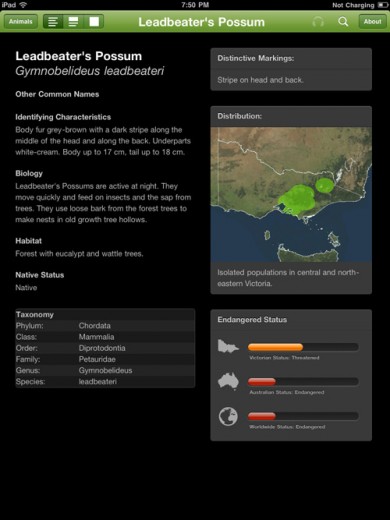 Fig 8: Details panel in full screen mode
 Figure 9: Images panel in full screen mode. Image credit: Dave Watts/davewattsphoto.com
Where the animal has associated audio files, the headphone icon in the toolbar is active, and when tapped, presents the audio files in a popover. The audio file is played when the user selects a row.
 Fig 10: Audio files for the Laughing Kookaburra
In landscape orientation, it is easier to browse through the animal list since it does not disappear when an animal is selected, as it does in portrait mode. This comes at the cost of sacrificing screen real estate for the detail view.
 Fig 11: Southern Argonaut in landscape orientation. Image credit: David Paul/dpimages
The details panel is formatted using an HTML template with an applied cascading style sheet. The app converts the template into pure HTML by replacing placeholder tags within the template with the properties for the animal. Organisations can customise the layout of the species data in the details panel by creating a new template and css files and overwriting the existing files. There are separate templates for the iPad and the iPhone/iPod Touch form factors.
5. Creating a field guide with your own data
First Steps
The application has been structured so that an organisation doesn't have to produce or update the objective-C code within the app. Adding the data, images and audio to the app, as well as compiling and uploading the app, requires a Mac computer and a copy of XCode, Apple's objective-C development tool.
In order for the organisation to appear as the seller of the app in the iTunes App Store, they will have to register with Apple as an iOS developer. At the time of writing, this costs US$99. This does not preclude the use of external developers to assist in the compiling of the app.
Getting the source code
A link to the source code repository can be found at the applications home page (http://museumvictoria.com.au/apps/field-guide/code/). Full details for the license can be found in the same location. In summary, the code can be reused and modified by anyone, as long as copyright acknowledgements are retained within the code. While Museum Victoria has chosen not to charge for its field guide, there is no restriction on other organisations charging for their guides if they wish to do so. It is important to note here that only the code for the field guide is being made available. The images, audio files and data within Museum Victoria field guide are not being shared.
Species Data
When the application runs for the first time on a device, it loads the species data from a text file called output.plist. The file contains a list of "taxons" at the start, and then the species data. The fields for the species data are listed in Table 1.
| Field | Subproperty | Required | Usage Notes |
|---|---|---|---|
| Identifier | Yes | The identifier comes from the primary data source. | |
| Commonname | Yes | Can contain multiple values. The first is used as the animal's display name, the rest are stored in the animal's commonNames property | |
| Phylum | Yes | ||
| Class | yes | ||
| Order | Yes | ||
| Family | Yes | ||
| Genus | Yes | ||
| Species | No | If there is no species set for an animal, the scientific name appear as Genus sp | |
| Nativestatus | No | If there is no native status given, the animal is assumed to be native. | |
| Conservationstatus | No | There can be zero to many conservation statuses. Each status has three different properties | |
| Authority | Yes | Source of status rating, e.g. IUCN Red List. | |
| Region | Yes | Jurisdiction (e.g. Worldwide) | |
| Status | Yes | Actual status, using the terminology of the authority (e.g. Threatened) | |
| Profileimages | Yes | There must be at least one profile image, but there can be multiple images. Each entry has two subfields | |
| Filename | Yes | Filename of the image file in the resource folder, including the extension. | |
| Credit | Yes | Photo credit text that appears at the bottom right of the image. | |
| Mapimage | Filename | No | |
| Squarecropimage | Filename | Yes | The squarecropimage is used as the thumbnail in the browse list. The image should be 75px square. Larger images will be sized down but this leads to poor performance when scrolling. |
| Audiofiles | No | Each audio file entry has two properties | |
| Filename | Yes | Filename of the audio file, including extension | |
| Credit | Yes | Audio credit that appears in the audio list. | |
| Taxongroup | Yes | Informal grouping of animals/plants to be used to aid navigation | |
| Taxonsubgroup | Yes | Informal grouping within an animal or plant group, used to aid navigation. | |
| Identifyingcharacteristics | No | Text description | |
| Biology | No | Text description | |
| Habitat | No | Text description | |
| Distribution | No | Text description | |
| Diet | No | Text description | |
| Distinctive | No | Text description |
Table 1: Species data fields
As an example, this is entry in the data file for the Stuttering Frog (Mixophyes balbus).
{
identifier = "291133";
commonname = (
"Stuttering Frog",
"Southern Barred Frog",
);
phylum = "Chordata";
class = "Amphibia";
order = "Anura";
family = "Myobatrachidae";
genus = "Mixophyes";
species = "balbus";
nativestatus = "native";
conservationstatus = (
{
authority="FFG";
region="Victoria";
status="Threatened";
},
{
authority="EPBC";
region="Australia";
status="Vulnerable";
},
{
authority="IUCN";
region="Worldwide";
status="Vulnerable";
},
);
profileimage = (
{
filename = "364719.jpg";
credit = "Murray Littlejohn";
},
);
mapimage = (
{
filename = "385590.jpg";
},
);
squarecropimage = (
{
filename = "390304.jpg";
},
);
audiofiles = (
{
filename = "367728.mp3";
credit = "Murray Littlejohn";
},
);
taxongroup = "Frogs";
taxonsubgroup = "Mixophyes";
identifyingcharacters = "Body yellow-grey with a white belly. Dark narrow stripes around the legs. Up to 8 cm long.";
biology = "Stuttering Frogs feed on insects and small frogs. The females are larger than the males.";
habitat = "Very wet forests, including rainforests.";
distribution = "Eastern Australia, including far-eastern Victoria.";
diet = "Carnivore";
distinctive = "Dark stripes across legs, pale blue in the eyes.";
},
Profile HTML template
The Animals details view combines a template, cascading stylesheet and the animal data to create a formatted HTML page. The template consists of standard HTML and special tags to indicate where to insert animal data. These special tags are listed in table 2.
| Property | Tag |
|---|---|
| Animal Name | <%animalName%> |
| Scientific Name | <%scientificName%> |
| Common Names | <%commonNames%> |
| Identifying Characteristics | <%identifyingCharacteristics%> |
| Biology | <%biology%> |
| Habitat | <%habitat%> |
| Native | <%native%> |
| Phylum | <%phylum%> |
| Class | <%class%> |
| Order | <%order%> |
| Family | <%family%> |
| Genus | <%genus%> |
| Species | <%species%> |
| Distinctive Markings | <%distinctive%> |
| Distribution (text) | <%distibution%> |
| Distribution Map | <%mapImage%> |
| Conservation Status | <%status-authority%> |
Table 2: Replacement tags for the HTML template
A tag may appear in multiple places within the template. Some tags have slightly different behaviour. The <%mapImage%> tag needs to be placed in the src attribute of an <img> tag in order to display the image. As there may be a number of different conservation statuses, the application will look for the value give by the authority suffix in <%status-authority%>.
As an example, the template for the detail view for Museum Victoria's field guide is shown below.
<!DOCTYPE html>
<head>
<link href="style.css" rel="stylesheet" type="text/css">
</head>
<body>
<section class="leftcolumn">
<header>
<h1><%animalName%></h1>
<h2><%scientificName%></h2>
</header>
<h3>Other Common Names</h3><%commonNames%>
<h3>Identifying Characteristics</h3><%identifyingCharacteristics%>
<h3>Biology</h3><%biology%>
<h3>Habitat</h3><%habitat%>
<h3>Native Status</h3><%native%>
<table>
<tr><th colspan="2">Taxonomy</th></tr>
<tr class="even"><td>Phylum:</td><td><%phylum%></td></tr>
<tr><td>Class:</td><td><%class%></td></tr>
<tr class="even"><td>Order:</td><td><%order%></td></tr>
<tr><td>Family:</td><td><%family%></td></tr>
<tr class="even"><td>Genus:</td><td><%genus%></td></tr>
<tr><td>Species:</td><td><%species%></td></tr>
</table>
</section>
<section class="rightcolumn">
<div class="widget" id="distinctive">
<h3>Distinctive Markings:</h3>
<p><%distinctive%></p>
</div>
<div class="widget" id="distribution">
<h3>Distribution:</h3>
<img class="distributionimage" src="<%mapimage%>"/>
<p><%distribution%></p>
</div>
<div class="widget" id="status">
<h3>Endangered Status</h3>
<ul>
<li><img src="icon_vic.png" alt="Victoria"><div class="track"><span class="<%ffg%>"></span>Victorian Status: <%status-ffg%></div></li>
<li><img src="icon_aus.png" alt="Australia"><div class="track"><span class="<%epbc%>"></span>Australian Status: <%status-epbc%></div></li>
<li><img src="icon_earth.png" alt="Earth"><div class="track"><span class="<%iucn%>"></span>Worldwide Status: <%status-iucn%></div></li>
</ul>
</div>
</section>
</body>
</html>
Some properties may not always have a value. If you wish to hide a section or heading in those circumstances, insert a class attribute with a value of the tag with the suffix "Class". If the value of the <%tag%> is null, the app will replace any instance of <%tagClass%> with "hidden". For example, if you wanted to hide the distinctive features heading when where were none, that section of the template would look like this:
<h3 class="<%distinctiveClass%>">Distinctive Markings</h3><%distinctive%>
Putting it all together
Images should be formatted as JPEG and audio files as MP3. The files, along with modified template, css and configuration files, are added to the resources folder using XCode. Once this is done, the application is ready to be tested in the iOS simulator, or deployed to devices on an ad-hoc basis for testing. Once the app has passed internal testing, it can be submitted to the iTunes App Store. As the code will have previously passed the approval process, there should be no problem with the app being approved, as long as the content meets Apple's guidelines.
Free or Paid?
As part of exploring these new methods of content distribution, the question of apps as a source of revenue is raised (Kelly 2011). On one side of the coin is the belief that charging for a museum app constrains the uptake by the potential audience. On the other side is the necessity or desire of a museum to try to create revenue from the sale of apps. There are a number of potential revenue models out there, with their own advantages and disadvantages. There are many nuances to the discussion, and each museum will need to find its own path.
Museum Victoria is releasing its Field Guide app as a free download, just as it did with its first app, "Please Touch the Exhibit". In the latter case, the app was developed and released to celebrate the 10th birthday of Melbourne Museum's relocation to its current building, and is free as a "birthday present" to the people of Victoria (and by extension, the world). In the case of the Field Guide, the impetus for its development was to make the most of an already-developed resource. In addition, it is also believed that a free app will reach a much wider audience, and Museum Victoria wants the app to be as widely used as possible. Finally, when gaining additional permissions to use the externally sourced images and audio files within the app, a number of contributors stated that they agreed only because no fee was being charged by the museum.
It is up to an individual organization to decide if, and how much, they will charge for an application built on the Field Guide platform. With wide adoption, the comparative success of free and paid versions may provide valuable data for the advancement of the discussion.
6. Future Directions
The first priority for improving the platform is adding the ability to update the species data via the Internet, rather than by deploying a new version of the app to the App Store. Ideally, the app would connect to a central server to check for new updates when the device is connected to the Internet via a Wi-Fi network. The application could potentially offer the ability to download extra images of particular animals if the user so desired. This could be a method of keeping the initial download smaller and allowing the users to customise the content to their taste; for example, loading more bird images if that's their main area of interest.
The decision on which other possible features, such as the inclusion of video, adding the ability to record sightings as described earlier in the text, will be made after evaluating the public's response to the app.
7. Conclusion
Museum Victoria will continue to build on the field guide to Victorian animals in 2011. We look forward to working with other organizations to improve and extend the field guide platform. We hope that the field guide platform will help other organizations get their data into the iOS ecosystem with a minimum of effort and cost. At Museums and the Web 2012, we hope to be able to report on how the platform develops and expands over the next 12 months.
8. Acknowledgements
It is always a danger when making a list such as this that somebody will be left out, and my sincerest apologies if that is the case. I would like to thank Dr Elycia Wallis and the rest of the team behind the Biodiversity Snapshots project. Without the work of the curators, developers, photographers, and sound recordists that contributed to that project, there would have been nothing for the Field Guide to display. I'd also like to thank those that tested and provided feedback on Museum Victoria's Field Guide.
Thanks again go to Dr. Elycia Wallis for reviewing this paper. It is a better document due to her input, but any mistakes are all mine.
9. References
Kelly, L. (2011). Mobile apps: to charge or not to charge? Last Updated January 19, 2011. Consulted January 30, 2011. http://www.australianmuseum.net.au/BlogPost/Audience-Research-Blog/Mobile-apps-to-charge-or-not-to-charge
Museum Victoria (2006). Melbourne's Wildlife - A Field Guide to the Fauna of Greater Melbourne. CSIRO Publishing.
Proctor, N. (2010). "The Museum Is Mobile: Cross-platform Content Design for Audiences on the Go". In J. Trant and D. Bearman (eds). Museums and the Web 2010: Proceedings. Toronto: Archives & Museum Informatics. Published March 31, 2010. Consulted January 30, 2011. http://www.archimuse.com/mw2010/papers/proctor/proctor.html
Stein, R (2010) "5 reasons why TAP should be your museum's next mobile platform". Written April 5, 2010. Consulted January 30, 2011. At http://www.imamuseum.org/blog/2010/04/05/5-reasons-why-tap-should-be-your-museums-next-mobile-platform/
Tokumine, S. (2011). "Mobile 3G data coverage in national parks and protected areas". Written January 16, 2011. Consulted January 30, 2011. at http://www.tokumine.com/2011/01/16/mobile-3g-data-coverage-in-national-parks-and-protected-areas/
