

1. Introduction
Beginning museum visitors often have little experience in interpreting and engaging with works of art. We have observed visitors who quickly peruse the galleries, glance at the works on view, and occasionally read labels and wall text, rather than taking the time to look deeply at a work of art and make meaning from it. Our interviews with beginning viewers reveal that they are often not comfortable forming or sharing their opinion about works of art.
When investigating the motivations of beginning visitors for visiting the museum, we considered Bell’s three key components of museum ecology from the visitor’s point of view (Bell 2002): liminality, sociality and engagement. Liminality refers to the museum visit as transformative and spiritual. Sociality refers to visitors’ needs to socialize with other visitors and become part of a community. Engagement refers to visitors’ expectations to engage with objects and learn new concepts - to be educated, but at the same time entertained. However, from interviews with beginning viewers from the Wellesley community, we found that learning is a primary motivation to visit the museum. We found that students who are beginning viewers rarely visit the museum on their own. They are more likely to visit while attending social events, during class visits, or when required to view works of art for an assignment. Students often do not immediately recognize how the museum is relevant to their own lives.
Using technology to help beginning visitors to develop their visual acuity and critical thinking skills, museums can make a lasting impact on visitors and help them learn to view the arts as relevant and valuable in their lives. Visitors who actively engage with works of art can develop a visual and verbal vocabulary that enhances their overall art-viewing experience, allowing them to experience art on both emotional and intellectual levels. When viewers are capable of describing and categorizing works of arts, and resonating with their multiple meanings, they typically begin to feel at home in a museum (Leder 2004, Rothstein 2010).
In this paper we describe the design, development, and evaluation of Art-e-Muse, a social mobile application that we developed for helping beginning viewers to engage with works of art. ARTeMuse was designed to foster the skills such as visual acuity and critical thinking needed to actively engage with works of art. Through the development and evaluation of ARTeMuse, we investigate how mobile human-computer interaction paired with social networking can help museums to redefine the museum experience for beginning viewers. We deployed ARTeMuse in the Ideal Figures gallery at the Davis Museum and evaluated its impact with 53 beginning viewers (see Figure 1).
This paper is organized as follows: we first review related work, and then describe the design and implementation of ARTeMuse. We present results from the evaluation of ARTeMuse and conclude with a discussion.
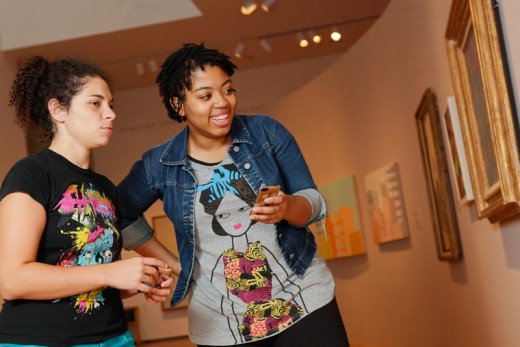 Fig 1: Using ARTeMuse in the Davis Museum
2. Related work: enhancing visitor participation through handheld tours
For years, museums have been offering handheld guides (audio tours) that allow users to key in an ID in order to retrieve commentary and explanatory content. Most handheld guides provided audio content that could be ‘pulled’ by the users, freeing them from the need to follow a linear sequence in the galleries. While handheld guides have increased in sophistication and capabilities, the main paradigm remained one-way, providing users with professionally curated content that helps to contextualize and interpret works of art.
In recent years, museum guide research has shifted to encouraging visitor participation and enhancing their social experience. For example, Sotto Voce (Aoki et al. 2002) is a museum guide that contains an audio sharing application that allows pairs of visitors to share audio information. Other group museum guides such as ARCHIE (Loon et al. 2007) and Kurio (Wakkary et al. 2009) have adopted a learning-game approach to social interaction. ARCHIE allows children to trade virtual cards with museum information to gain points; Kurio targets family groups, engaging them in a time travel game. Kurio (Wakkary et al. 2009) takes a tangible interaction (Ishii and Ullmer 1997, Shaer and Hornecker 2010 ) approach to foster playful interactions. Tangible interaction is a computing paradigm in which the real non-digital world is augmented by embedding computation into physical objects and environments. Augmented objects then serve as representation of digital information or computational functions.
Participatory systems such as ArtLinks (Cosely et al. 2008), MobiTags (Cosely et al. 2009), and Imprints (Boehner et al. 2005) allow visitors to personalize their visits, navigate, and connect with other visitors by creating and viewing tags associated with individual objects. While tagging can help create an outlet for personal and social expression, it does not necessarily provide the visitors with a framework for constructing deep meaning. Many tags represent personal meaning and opinions, and as a result obscure important content such as artistic traditions or cultural significance (Rothstein 2010).
With the proliferation of mobile devices, museums have started offering applications that act as more comprehensive guides for visitors, offering explanatory text, audio, video and images, as well as additional information through Internet connection. Leveraging location data, mobile applications often offer event information, interactive maps, and other location-based information. However, current applications suffer several limitations ,including (Rothstein 2010) distracting the user from the actual objects in front of them, providing awkward input techniques, and reinforcing rigid paths where only some pieces are singled out.
3. ARTeMuse: Design Strategies
In the designing of ARTeMuse, we applied four interrelated design strategies that include participatory design, learning-centered design, social networking, and simplicity. We briefly define these strategies below.
Participatory design
ARTeMuse was designed using a participatory design methodology. Wellesley college students served as creators, content producers and evaluators of a social-mobile application for students. Five students led the development of the application, collaborating closely with faculty and museum staff throughout the iterative design process. From May to July 2010, we conducted a series of participatory design workshops with students, faculty, and museum staff (overall, 23 participants) in which users viewed art, tried an interactive prototype, and participated in a focus group. The focus groups were facilitated by the student developers and focused on the personal goals of the participants, strengths and weaknesses of the application, general feedback, and suggestions for improvements to the interface. The team continuously refined the design and functionality of ARTeMuse based on users’ feedback. Following the release of a stable version, we evaluated the impact of the application with 53 beginning-viewer students.
This participatory design process resulted in an educational experience for the students involved in developing and evaluating the application. They learned to design iteratively, implement, and evaluate a social-mobile application and became invested in the success of the application. In addition, this process attracted first-time visitors to the museum and made them active participants in a dialogue about art and museum going.
Learning-centered design
In developing ARTeMuse, all design decisions were conceived with the goal of promoting learning. Specifically, the team chose a constructivist approach in designing the application. The constructivist approach views learning as an active process in which learners construct new ideas based on their existing knowledge and experiences (Naismith et al. 2004), where learners are encouraged to be active constructors of new knowledge. As means to engage learners and improve access to existing knowledge, the constructivist perspective encourages the design of activities that exploit the senses and engage visitors in a social dialogue. Mobile devices provide a unique opportunity to promote constructivist learning. They facilitate situated learning (Naismith et al. 2004), which takes place in an authentic context, and provides means for actively interacting with content. We diverged from the traditional one-way museum guide paradigm in which users consume professionally curated information by encouraging learners to become active constructors of knowledge through forming responses to prompts and sharing their responses and recommendations with their friends. ARTeMuse provides an environment in which users actively participate in the learning process. The application encourages meaning-making that combines the users’ existing knowledge with newly acquired information. In the design of ARTeMuse we also considered the four conditions identified by Falk (2009) for a “learning for fun” experience: 1) a sense of discovery or fascination, 2) appeal to multiple senses, 3) the appearance of effortlessness, and 4) the availability of choice.
Social networking
Social networking sites have become the most frequently visited sites on the Web. Users spend increasingly more of their free time using these sites to connect and communicate with friends, and to share information and recommendations. Facebook is ubiquitous on college campuses, and ARTeMuse attempts to leverage its popularity by using the Facebook API to foster a dialogue that centers on art and potentially encourages visits to the museum.
Simplicity
Mobile applications for museums have become increasingly feature-rich and sophisticated, providing collections search tools, high quality video, interactive games, way-finding functionality, and push notifications for events happening while a visitor is in the museum. However, often as the application functionality increases, so does complexity in the user interface. While developing ArteMuse, the team viewed the ideal mobile application for museums as one that enhances the visitor experience, but minimizes distraction from the original art works displayed in the galleries. Therefore, in designing the application, we strove for simplicity by distinguishing between core functionality that should be easily accessed by users while in the galleries from secondary features that should be readily available, but hidden when not needed. Moreover, we did not want to duplicate functionality that could be provided by other means such as the museum website. Our ultimate goal was to produce an intuitive user interface that had a minimal learning curve for all users.
4. ARTeMuse: Design and Implementation
Based on the participatory design sessions with students, faculty, and museum staff, we set three concrete goals for ARTeMuse: 1) facilitate deep engagement with works of art; 2) promote dialogue about works of art and museum going among members of a community; and 3) encourage repeat visits to the museum. To accomplish these goals, ARTeMuse was designed for interaction within the museum, not as a distance learning tool. Moreover, the use of prompts and closed questions diverges from the traditional audio guide approach of passive listening to experts providing information about the works on view.
Initiating interaction with works of art
The ARTeMuse application allows visitors to scan two-dimensional QR codes placed on wall labels (in devices that do not contain a camera, the application automatically presents a keypad that enables users to manually enter an accession number instead). ARTeMuse then presents users with the title and a thumbnail image of each object in the Ideal Figures gallery. We purposefully chose not to present high-quality images of the art work on view in the galleries. The thumbnails serve as a visual cue that the users are in front of the correct work and encourage the viewers to analyze the original work in front of them. The application displays a prompt titled Lookthat invites users to look deeply at the piece, explicitly directing the users’ attention to the work of art. Figure 2 shows the scanning of a QR code and the Lookprompt that follows.
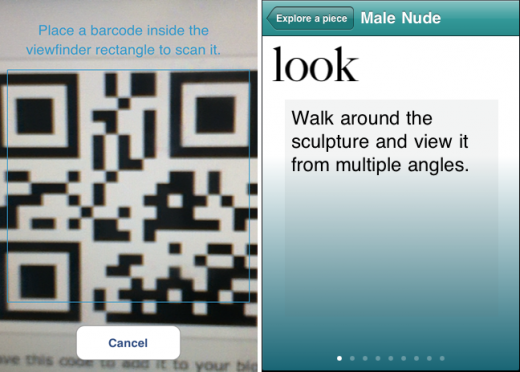 Fig 2: QR code scanner and the initial Look prompt
The application presents users with a series of prompts that serve to create an interactive and reflective experience. The prompts are short and specific to each work of art and may include questions that encourage deep looking, anecdotal facts, and brief exercises requiring users to consider narrative, style, artistic intent, and technique. The prompts are diverse in style. We chose to use questions that utilize constraints (e.g. choosing from a list, choosing from a color palette) in order to minimize typing and allow users to focus on the works of art. Users can move with ease between questions, as well as go back to previously answered questions. The application maintains a history tab that allows users to revisit works of art and view their original responses.
Asking questions is a common technique for motivating visitors to respond to and engage deeply with objects, and for modeling active art viewing (Simon 2010). Questions can also create new connections between people and works of art. We chose questions that are open to a diversity of responses, with no right or wrong answers, and evaluated them with users during the participatory design sessions. ARTeMuse uses three types of questions: object-centered questions that encourage users to investigate a work of art, personal questions that draw on users’ unique experiences, and connecting questions that encourage visitors to make connections between works of art in the gallery.
Sharing with Friends
ARTeMuse allows users to share their responses to the prompts and to recommend works of art to their Facebook friends. Friends can then respond to each other by following up on other users’ entries. Sharing is optional and could be done easily with the press of a button. Falk (2009) asserts that museum visitors are almost always motivated by a desire to fulfill an identity-related need. Sharing with friends allows users to build their identity in respect to works of art and visits to the museum. Figure 3 shows a recommendation of a work of art that a user has shared with her friends through Facebook.
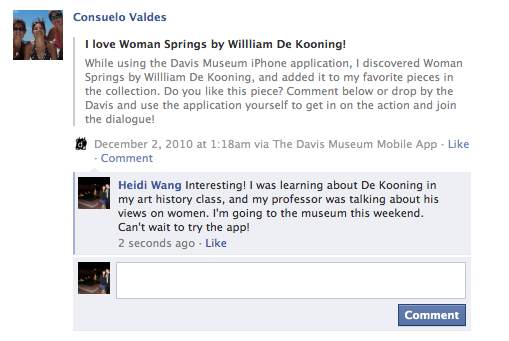 Fig 3: Demonstration of dialogue created by students using the Facebook API
Glossary
In order to help users expand their vocabularies, ARTeMuse provides a glossary of terms related to the works displayed in the Davis’ collections. The glossary can be accessed from the main page of the application or directly from the prompts where particular terms are highlighted and linked to the glossary (see Figure 4).
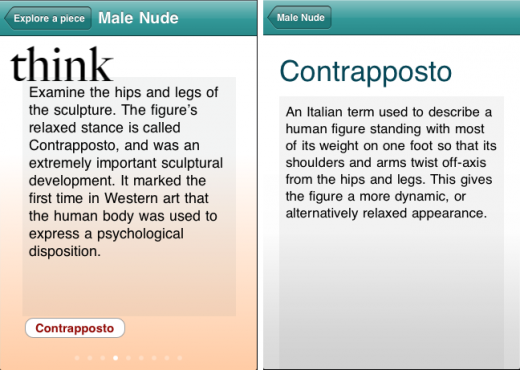 Fig 4: A prompt with a highlighted term next to the corresponding glossary definition
Game mechanics
To increase users’ engagement we applied several elements of game mechanics. We reward users for completing the exploration of individual works by allowing them to collect coins and jewelry from the Davis Museum’s collection - items that are currently not on display (see Figure 5). Users can share their collection with their friends through Facebook.
 Fig 5: Example of a congratulations message that presents the user with a coin and a treasure box that displays the reward collection
Implementation
ARTeMuse is implemented as an iPod Touch and iPhone application using the iPhone SDK. We utilized the Facebook API for implementing the integration with Facebook. The QR code reading is implemented using the ZXing image-processing library.
Evaluation
To understand the impact of ARTeMuse on the art viewing experience of beginning museum visitors, we deployed the application in the Ideal Figures gallery at the Davis Museum and conducted a study with 53 participants. The participants were Wellesley students (all female, age range 18-23) with backgrounds in a variety of science, humanities, and social science disciplines. None of the participants was an Art History or Studio Arts major. Participants were recruited through on-campus mailing lists and volunteered to participate in the study.
Between October 2010 and January 2011, we conducted a series of lunchtime sessions with 6-18 participants in each session. Participants were first instructed to view art in an adjacent gallery that is not yet supported by the ARTeMuse application. Users then completed a questionnaire designed to gauge their intellectual and emotional comfort in that gallery. We then asked users to move and view artwork in the Ideal Figures gallery, using the ARTeMuse application. Following their interaction, they were given a questionnaire designed to compare their emotional and intellectual experiences both with and without the application. Both of these galleries, which are similar in size and in physical layout, are part of the museum’s permanent collection installation. Following the study, users were invited to engage in lunchtime conversations designed to elicit their feedback and ideas.
We collected data through questionnaires, observations, log files, and semi-formal interviews. Below, we describe findings from the evaluation of ARTeMuse. We present both quantitative results and qualitative observations.
5. Results
Viewing Experience
Art-viewing experience data was collected from users through subjective questionnaires. Participants answered a similar set of questions following their visit to the gallery where they viewed art without the application, and after their visit to the Ideal Figures gallery where they used the application when viewing art. About 30 percent of the participants shared a device with a partner while using the application. Table 1 shows a summary of the questions and participant responses on a Likert scale of 6. We analyzed the data using a repeated measures t-test.
The results indicate that when using the application, participants tended to rely less on the wall label (t(52) =3.1 p=0.001) and that the wall label played a slightly less important role in shaping their appreciation of a work of art (t(52)=1.5 p=0.06). However, there was no statistically significant effect on the extent to which participants were emotionally affected by works of art. Using the application, participants discussed the art with a friend to a greater extent (t(52)=4.8 p<0.001), and felt more comfortable expressing their opinions about a work of art to a friend (t(49)=5.2 p<0.001), although these findings can be attributed to the fact that about 30 percent of the users shared a device while using the application. Participants also found it easier to formulate an opinion about a work of art (t(52)= 2.7 p=0.004). In addition, participants reported that their conversations in the gallery were mainly focused on the art (t(49)=4.8 p<0.001) and that they felt more comfortable in the gallery (t(52)=2.4 p=0.009). In the words of two of the participants: "It [the application] definitely helped me to form my own opinion about a piece, which I normally don’t go out of my way to do”. “I liked the interactive aspect and how it made me consider details I didn’t notice before – just being told to look at pieces from all angles made me more observant”.
Interestingly, there was no significant effect on the extent to which participants enjoyed viewing the art with or without the application. However, participants reported that they enjoyed using the application (M=4.9 SD=1.05 on a scale of 6).
| Question | Post- Gallery (without application) | Post-Ideal Figures Gallery ( with application) | |||
|---|---|---|---|---|---|
| M | SD | M | SD | ||
| Q1 | I read a work of art's wall tag to find out more about a piece. | 5.46 | 0.79 | 4.78 | 1.60 |
| Q2 | A work's wall tag played an important role in helping me appreciate the piece. | 4.75 | 1.19 | 4.30 | 1.53 |
| Q3 | I was emotionally affected by a work of art. | 3.63 | 1.58 | 4.10 | 1.30 |
| Q4 | I discussed a work of art with a friend. | 2.42 | 1.7 | 4.72 | 1.56 |
| Q5 | I felt comfortable expressing my opinion about a work of art to another person. | 3.75 | 1.56 | 4.99 | 1.00 |
| Q6 | My conversations in the gallery were most always relevant to a work of art. | 3.48 | 1.74 | 4.97 | 1.33 |
| Q7 | I felt comfortable in the gallery. | 5.00 | 1.06 | 5.33 | 0.80 |
| Q8 | It was easy for me to formulate an opinion about the art I viewed. | 4.38 | 1.09 | 4.75 | 1.04 |
| Q9 | I enjoyed viewing the art in this gallery. | 4.98 | 0.95 | 5.15 | 1.01 |
Table 1: A summary of participant responses to the post-viewing questionnaire. All answers are on a scale of 6.0
Using ARTeMuse
We also collected quantitative and qualitative data about participants’ perception of ARTeMuse. Table 2 shows a summary of the questions and participant responses on a Likert scale of 6. In general, we found that study participants enjoyed using the application (M=4.9 SD=1.05) and spent a longer amount of time using it than they thought they would (M=5.2 SD=1.06). Most participants reported that the application made them think about art in new ways (M=4.5 SD=1.35) and increased their engagement with works of art (M=5.2 SD=0.95). In the words of one of the study participants: “I was surprised by how much I really did enjoy using the app, and it wasn’t distracting me”. Another participant said: “It made me look longer and think about things I wouldn’t have otherwise”.
Some participants found that the application interfered with the ways they typically relate to art and that it distracted them. In particular, participants reported that using the iTouch keyboard was difficult and time-consuming. Multiple users made this point, although the application required minimum text entry. In addition, participants gave mixed responses regarding the game mechanism implemented by ARTeMuse. Some users felt that the game mechanism was targeting a younger audience; others enjoyed the game aspect of the application.
| Question | Post-Ideal Figures Gallery (with application) | ||
|---|---|---|---|
| M | SD | ||
| Q10 | I spent a longer amount of time interacting with the application than I thought I would. | 5.2 | 1.05 |
| Q11 | The application made me think about art in a way I never had before. | 4.37 | 1.45 |
| Q12 | The application made me feel more comfortable expressing my opinions about art. | 4.33 | 1.34 |
| Q13 | The application helped me formulate my opinion about a piece of art. | 4.57 | 1.32 |
| Q14 | The application increased my engagement with a work of art. | 5.15 | 0.99 |
| Q15 | The application negatively interfered with the way in which I relate to art. | 2.15 | 1.29 |
| Q16 | The application distracted me from my normal art viewing process | 2.81 | 1.57 |
| Q17 | I enjoyed using the application. | 4.87 | 1.08 |
| Q18 | I would use this application if it were offered by the Davis Museum. | 4.70 | 1.41 |
Table 2: A summary of participant responses to the post-viewing questionnaire. All answers are on a scale of 6.0
Time spent in the gallery
In one of the evaluation sessions (N=18), we measured the time participants spent with each work of art in the gallery when viewing art without the application, and then with each work of art in the Ideal Figures gallery, when viewing art with the application. We found that on average, participants spent about 39 seconds with a work of art when viewing art without the application, and about 3 minutes and 15 seconds viewing art while using the application. The average time participants spent in the first gallery was 11 minutes. During that time participants moved around often and viewed most of the works of art in the gallery. Using the application, participants spent on average 18 minutes in the gallery, focusing on some of the pieces rather than moving around to view all works of art. Using the application, participants spent more time with each work, and more time in the gallery.
Participant responses
Our evaluation questionnaires also asked study participants a series of free response questions about their favorite and least favorite aspects of viewing art and using ARTeMuse. When reviewing participant responses, we noticed several emerging themes. Answers following the gallery where art was viewed without the application featured comments related to aesthetic and formal qualities of specific works, to the wall text provided in the gallery, and to the curation of the gallery. Answers following the visit to the Ideal Figures gallery (where art was viewed with the application), featured comments that also related to the formal qualities of the works on view, but indicated that users analyzed the works more deeply, using vocabulary introduced by the application. Participants also commented on the interactive nature of their art viewing experience, on the information they learned, and on their process of formulating opinions about art.
Collaboration
Around 30 percent of the study participants shared a device with another participant while using the application. Although the application was not explicitly designed for collaborative use, many of the participants who used the application with a partner reported higher levels of enjoyment. Specifically, those testing the application with a partner stated that they felt more comfortable discussing their opinions with a partner than they would have felt typing their own responses into the device. One participant stated: "The interactive/collaborative nature was AWESOME! Love discussing our opinions and laughing together. This made the museum experience 10x better". Study participants who tested the application without a partner often compared their experience to that of the pairs. One such participant wrote in her post-study questionnaire that she "would have preferred to talk about [her] thoughts [with] another visitor". These unexpected results have led us to consider ways in which we could redesign ARTeMuse to better facilitate collaborative use, including the elimination of prompts that require textual input, and the creation of a version of the application for the iPad device.
6. Discussion
This study takes a comparative approach to understanding the impact of ARTeMuse on the art viewing experience of beginning museum visitors and considered both quantitative and qualitative data. The results indicate that ARTeMuse helped beginning viewers to engage with works of art and to learn new ways of thinking about art; it also increased their ability to discuss and form an opinion about works of art. The findings indicate that participants enjoyed this semi-structured art viewing experience.
While the study results show that ARTeMuse achieved its first design goal, to facilitate deep engagement with works of art, a further investigation in the form of a longitudinal study is required in order to learn whether ARTeMuse achieved its second and third design goals: to promote dialogue about works of art and museum going between members of a community, and to encourage repeat visits to the museum. During this study, perhaps due to its structured nature and to the relatively short time users spent with the application, participants made little use of the social networking functionality. In the future, we intend to use log files to assess social network activity as well as to monitor the number of beginning viewers who visit the museum on their own and use ARTeMuse in the galleries.
7. Conclusions and Future Work
This paper describes the design, implementation, and evaluation of ARTeMuse, a social-mobile application designed to enhance the art viewing experience of beginning art gallery visitors. This work illustrates the potential of social-mobile systems to help beginning visitors to engage with works of art and to develop their visual acuity and critical thinking skills. This works also highlights four design strategies for social-mobile applications targeting beginning viewers: participatory design, learning-centered design, social networking, and simplicity; and also presents a comparative evaluation methodology to assess the impact of a social mobile application on beginning viewers. However, several questions remain open. For example, can a social-mobile application help to develop a community-wide dialogue about art? If so, can we evaluate the extent and depth of such dialogue? Do beginning visitors seek personalized experiences, and if so, how can we utilize social-mobile systems to provide such experiences?
This work could be expanded in several ways. First, to enhance the social functionality of the application, we are currently developing visualizations that display aggregated user responses. In addition, we are investigating ways to increase user participation levels, perhaps by allowing users to curate and share tours of the museum and vote for particular works from the Davis’ collection to be displayed. We are also developing content so that ARTeMuse could be deployed in additional galleries. Finally, to further investigate the impact of social-mobile applications on beginning viewers, we are evaluating the use of ARTeMuse in contexts other than fine art. We developed another implementation of ARTeMuse for the Wellesley College Botanical Garden: it helps beginning viewers to engage with and relate to specimens. We are currently evaluating its use with beginning visitors.
8. Acknowledgements
We would like to thank Lisa Fischman, Ruth Gordon Shapiro ’37 Director of the Davis Museum. We would also like to acknowledge the following Wellesley College students for their contribution to this work: Lia Napolitano, Michelle Ferreirae, Heidi Wang, and
9. References
Aoki, P. M., R.E. Grinter, A. Hurst, M.H. Szymanski, J.D. Thornton and A. Woodruff (2002). “Sotto voce: exploring the interplay of conversation and mobile audio spaces”. In Proceedings of the SIGCHI conference on Human factors in computing systems.Minneapolis, Minnesota: ACM.
Bell, G. (2002). Making Sense of Museums: The Museum as 'Cultural Ecology': A study. CIMI whitepaper, Intel. Available: http://echo.iat.sfu.ca/library/bell_02_museum_ecology.pdf
Boehner, K., J. Thom-Santelli, A. Zoss, G. Gay, J.S. Hall, & T. Barrett (2005). “Imprints of place: creative expressions of the museum experience”. CHI '05 extended abstracts on Human factors in computing systems. Portland, OR: ACM.
Bransford, J. (2000). How people learn: Brain, mind, experience, and school. Washington, DC: National Academies Press.
Cosley, D., J. Baxter, S. Lee, B. Alson, S. Nomura, P. Adams, C. Sarabu & G. Gay (2009). “A tag in the hand: supporting semantic, social, and spatial navigation in museums”. In Proceedings of the 27th international conference on Human factors in computing systems. New York: ACM.
Cosley, D., J. Lewenstein, A. Herman, J. Holloway, J. Baxter, S. Nomura., K. Boehner, G. Gay (2008). “ArtLinks: fostering social awareness and reflection in museums”. In Proceeding of the twenty-sixth annual SIGCHI conference on Human factors in computing systems. Florence, Italy: ACM.
Falk J. H. (2009). Identity and the Museum Visitor Experience.Walnut Creek, California: Left Coast Press.
Falk, J.H. & L. Dierking (2000). Learning from museums: visitor experiences and the making. Walnut Creek, CA: AltaMira Press.
Falk, J. H. & L. Dierking (1992). The Museum Experience. Washington: Whalesback Books.
Fitzmaurice, G. W., H. Ishii, W.A.S. Buxton (1995). “Bricks: laying the foundations for graspable user interfaces”. Proceedings of the SIGCHI conference on Human factors in computing systems.Denver, Colorado: 442-449.
Ishii, H. & B. Ullmer (1997). “Tangible bits: towards seamless interfaces between people, bits and atoms”. Proceedings of the SIGCHI conference on Human factors in computing systems.Atlanta: 234-241.
Leder, H., B. Belke, A. Oeberst & D. Augustin (2004). “A model of aesthetic appreciation and aesthetic judgments”. British Journal of Psychology95, 4, 489-508.
Naismith, L., P. Lonsdale, G. Vavoula & M. Sharples (2004). Literature Review in Mobile Technologies and Learning, Report 11.NESTA Futurelab Series.
Rothstein, E. (2010). “From Picassos to Sarcophagi, Guided by Phone Apps”. New York Times, October 1, 2010. Available: http://www.nytimes.com/2010/10/02/arts/design/02apps.html
Shaer, O. & E. Hornecker (2010). “Tangible User Interfaces: Past, Present, and Future Directions”. Foundations and Trends in Human-Computer Interaction.Vol. 3, Issue 1-2.
Simon, N. The Participatory Museum, Museum 2.0, Santa Cruz, California. http://www.museumtwo.blogspot.com/
Van Loon, H., K. Gabriëls, D. Teunkens, K. Robert, K. Luyten, K. Coninx & E. Manshoven (2007). “Supporting social interaction: a collaborative trading game on PDA”. In J. Trant and D. Bearman, eds. Museums and the Web: Selected papers from Museums and the Web 2007.Toronto: Archives and Musems Informatics. Available: http://www.archimuse.com/mw2007/papers/vanLoon/vanLoon.html
Wakkary, R., M. Hatala, K. Muise, K.Tanenbaum, G. Corness, B. Mohabbati, & J. Budd (2009). “Kurio: a museum guide for families”. In Proceedings of the 3rd International Conference on Tangible and Embedded Interaction(TEI '09). New York: ACM. 215-222.
